S91BOX Collect Cards Lucky Draw
What Is S91BOX Collect Cards Lucky Draw?
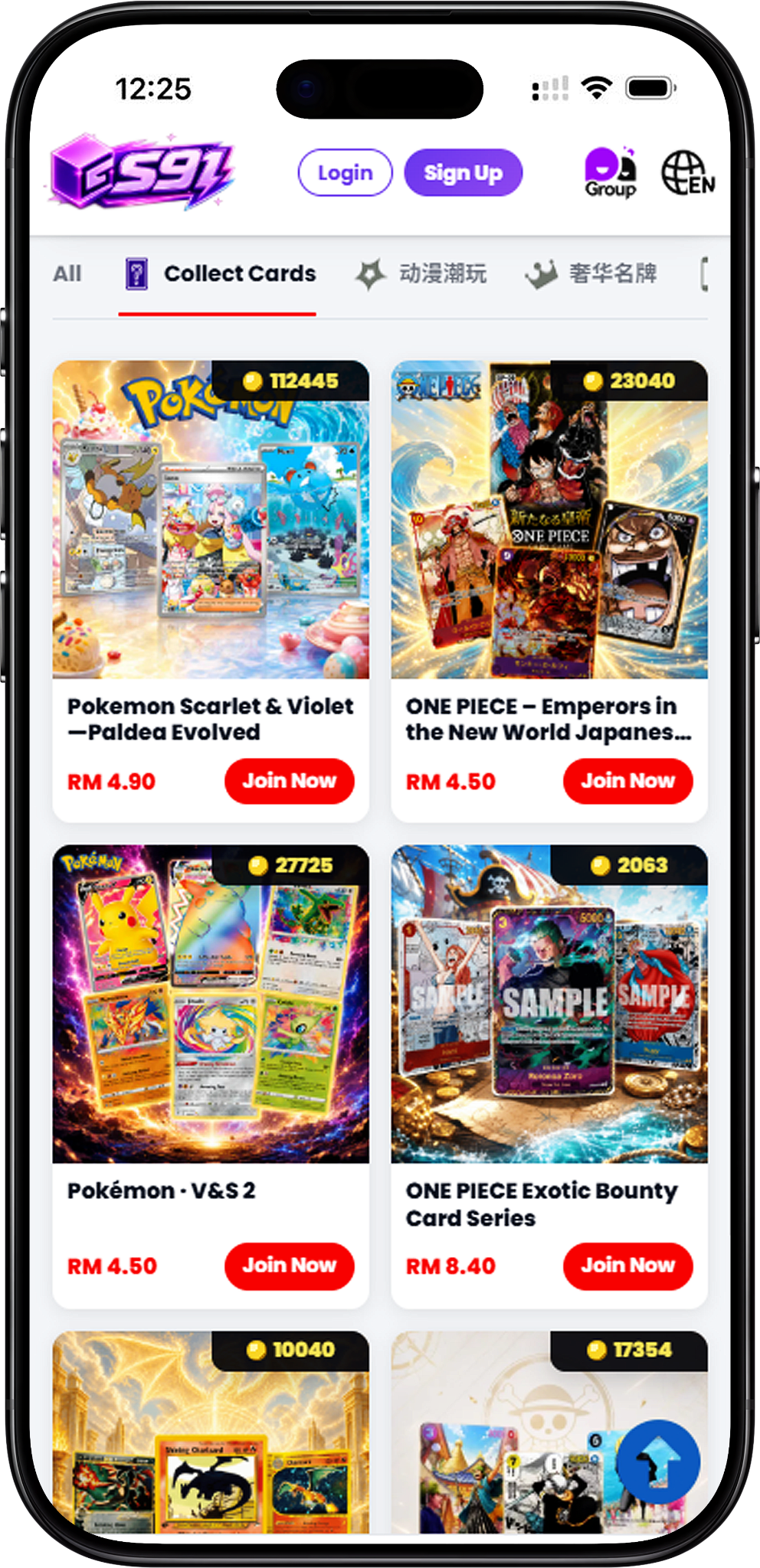
S91BOX Collect Cards Lucky Draw is the Collect Cards category within S91 Lucky Draw. It brings together card-themed draws featuring Pokémon and ONE PIECE collections. Each available collection has its own Lucky Draw entry, allowing users to open a specific draw and view its featured card selection before participating.
Pokémon and ONE PIECE Collect Cards
The category covers multiple Pokémon and ONE PIECE collections rather than placing every card under a single draw. Users can browse the available Collect Cards entries and choose the collection they want to explore.
Collect Cards Lucky Draw Collection
The complete Collect Cards Lucky Draw selection shown for S91BOX includes: Pokemon Scarlet & Violet – Paldea Evolved; ONE PIECE Card Game – Royal Bloodline (Japanese Edition); Pokémon Scarlet & Violet Expansion Pack: Super Electric…; Pokémon Scarlet & Violet; ONE PIECE – Emperors in the New World Japanese Ver. 2; and Pokémon · V&S 2.
Pokemon Scarlet & Violet – Paldea Evolved
Pokemon Scarlet & Violet – Paldea Evolved is one of the Pokémon-themed selections available under Collect Cards. Open this Lucky Draw to view the featured cards and current draw information displayed for the collection.
ONE PIECE Card Game – Royal Bloodline (Japanese Edition)
ONE PIECE Card Game – Royal Bloodline (Japanese Edition) provides a ONE PIECE-themed Collect Cards option. Users can enter the collection from the Lucky Draw category to explore its available card selection.
Pokémon Scarlet & Violet Expansion Pack: Super Electric…
Pokémon Scarlet & Violet Expansion Pack: Super Electric… is another Pokémon collection available in S91BOX Collect Cards. Its individual Lucky Draw page displays the cards included in that collection.
Pokémon Scarlet & Violet
Pokémon Scarlet & Violet provides another Collect Cards Lucky Draw choice for users interested in the Pokémon card selections available through S91BOX.
ONE PIECE – Emperors in the New World Japanese Ver. 2
ONE PIECE – Emperors in the New World Japanese Ver. 2 expands the category with another ONE PIECE card collection. Open the draw to view its featured card lineup and draw information.
Pokémon · V&S 2
Pokémon · V&S 2 completes the current Collect Cards selection shown for this category, providing an additional Pokémon-themed Lucky Draw to explore.
How S91BOX Collect Cards Lucky Draw Works
Start by choosing a Collect Cards collection and selecting Join Now. Inside the selected Lucky Draw, the interface displays the current draw number, featured cards and available draw controls. Review the information shown for the active draw before choosing how many draws you want to make.
Step 1 – Choose a Collect Cards Draw
Browse the Collect Cards category and select the Pokémon or ONE PIECE collection you want to explore.
Step 2 – Open the Lucky Draw
Select Join Now on the chosen collection to enter its Lucky Draw interface and view the featured cards.
Step 3 – Review the Current Draw
Check the current draw number, displayed card selection and other draw information provided on the screen before proceeding.
Step 4 – Choose a Draw Option
Select one of the available draw quantities shown in the interface. The displayed options include Draw 1, Draw 3, Draw 5 and Draw 10.
Step 5 – Confirm Before Payment
Review the payment confirmation screen, including the wallet balance, selected draw total and available payment information, before selecting Pay Now.
Explore Cards Before a Draw
Each Collect Cards Lucky Draw displays its featured cards directly within the draw interface. This lets users browse the available card selection and view the information shown for individual cards before deciding whether to participate.
Featured Card Selection
The card area displays the featured Collect Cards items for the selected draw. Depending on the collection, the page may include Pokémon or ONE PIECE cards associated with that particular Lucky Draw.
Draw Information
The Lucky Draw interface also presents information related to the active draw, including its draw number and the outcome categories displayed on the page. Users can review this information alongside the featured cards.
Draw Options and Payment
S91BOX provides several draw quantity controls within the Collect Cards interface. After choosing a draw option, users can review the confirmation panel before completing payment.
Draw 1, Draw 3, Draw 5 and Draw 10
The interface shown provides four quantity options: Draw 1, Draw 3, Draw 5 and Draw 10. Choose the number of draws you want before proceeding to confirmation.
Confirm Payment
The Confirm Payment panel displays your wallet balance, payment option, voucher area when applicable and the total for the selected draws. Review the displayed amount before proceeding.
Wallet Balance and Top Up
The payment panel shows the available Wallet Balance and provides a Top Up option. If you proceed with the displayed balance payment method, check the draw total before selecting Pay Now.
Collect Cards Draw History
The History feature allows users to review previous Lucky Draw activity. The history panel displays past draw entries and provides filters for different result categories shown by the platform.
View Previous Draws
Open History from the Lucky Draw interface to see previous entries, including information such as the draw number, displayed result and other details provided for each recorded draw.
Filter Draw History
The history interface provides category filters, including All, SP and A, so users can narrow the displayed draw records according to the available result types.
Draws Without SP and A
The History panel also displays counters for the number of draws without an SP result and without an A result. These counters describe past draw history shown by the platform and do not determine the result of a future draw.
S91BOX Collect Cards Lucky Draw FAQ
What is S91BOX Collect Cards Lucky Draw?
It is the S91BOX Lucky Draw category dedicated to card collections, with available selections featuring Pokémon and ONE PIECE cards.
Which Collect Cards Lucky Draws are available?
The complete selection shown includes Pokemon Scarlet & Violet – Paldea Evolved; ONE PIECE Card Game – Royal Bloodline (Japanese Edition); Pokémon Scarlet & Violet Expansion Pack: Super Electric…; Pokémon Scarlet & Violet; ONE PIECE – Emperors in the New World Japanese Ver. 2; and Pokémon · V&S 2.
How do I enter a Collect Cards Lucky Draw?
Choose a collection from the Collect Cards category and select Join Now to open its Lucky Draw page.
How many draws can I select at once?
The interface shown provides Draw 1, Draw 3, Draw 5 and Draw 10 options. Review your selected quantity and displayed total before confirming payment.
Can I check previous Collect Cards draw results?
Yes. Select History within the Lucky Draw interface to review the previous draw records displayed by S91BOX.
Can I filter the Lucky Draw history?
Yes. The History interface shown includes All, SP and A filters for reviewing different groups of past draw records.
Does the draws-without counter predict the next result?
No prediction is established by the displayed counter. It records the number of past draws without the specified result; each future result should not be inferred from that historical count alone.
Explore S91BOX Collect Cards
Browse the available Pokémon and ONE PIECE collections, choose a Collect Cards Lucky Draw and review its featured cards and draw information.